Personal project · Hardware / Virtualization
Rack-Mounted Virtualization Lab
I built a rack-mounted Proxmox server to practice systems administration and run my own lab VMs.
I selected the components, assembled the server, and set up Proxmox VE. Reusing hardware helped keep costs down. Once it was running, I worked on networking, VM templates, and checks to make sure the setup behaved as expected.
Personal learning environment · Separate from my professional client work
Explore the engineering decisions ↓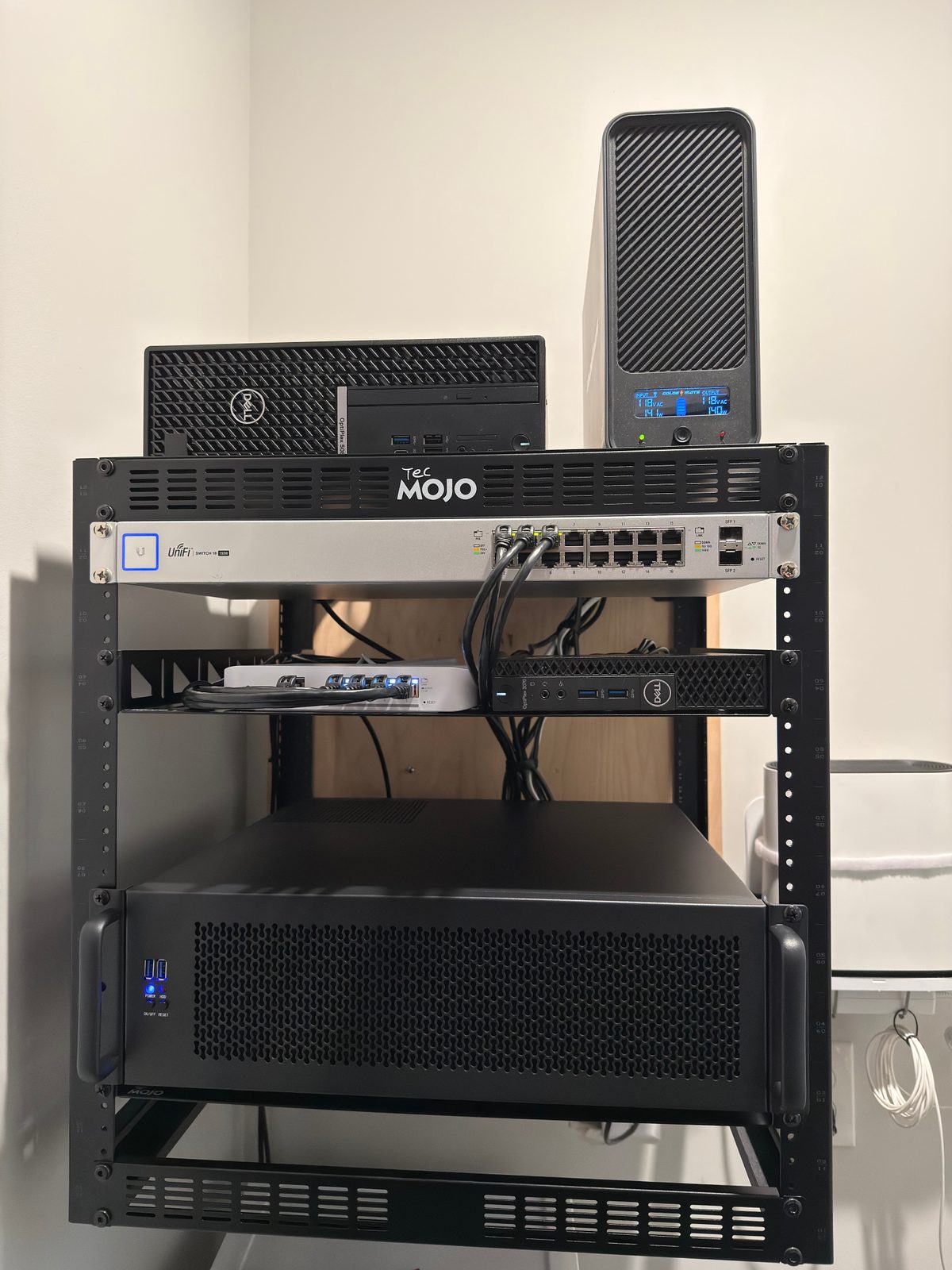
This is a personal lab where I practice infrastructure administration. It is not a production data center.
01 · Design within constraints
Choosing parts that fit
The build started with practical constraints: chassis dimensions, motherboard compatibility, cooling clearance, expansion-card fit, power requirements, and rack mounting. I used a RackChoice 3U chassis and a desktop-component platform to balance capability with reuse and cost control. I considered airflow and clearance during planning, but I don’t have thermal or stress-test results to report.
- Compute
- Intel Core i7-14700KF
- Memory
- 80 GB DDR4 installed
- Motherboard
- ASUS PRIME Z690-P WIFI D4
- Power supply
- Corsair RM750e · 750 W
- Rack integration
- RackChoice 3U chassis
- Networking
- Onboard Realtek + Intel X550-T1
02 · Give each interface a purpose
A virtualization-first foundation.
I considered Proxmox, Unraid, and TrueNAS, then selected Proxmox VE for the virtualization-focused workload. The network configuration gives host management and guest traffic dedicated bridge/interface roles.
vmbr0· Management- Onboard Realtek interface for host administration.
vmbr1· Guests- Intel X550 interface; intentionally no host IP address or default gateway on this bridge.
I checked routing to avoid a competing default route, including an unintended IPv6 default-route issue. The guest bridge has no host address or default gateway. Separate bridges alone do not provide VLAN isolation, firewall rules, or secure tenant separation.
03 · Repeat the foundation, not the setup effort
Templates and purposeful guests.
I created a Debian 13 cloud-init template and provisioned VMs for Docker, DNS, and utility roles. A Linux lab VM received tools, SSH-key access, and a baseline snapshot. The template gives new guests a consistent starting point. Provisioning is not fully automated.
I also provisioned a Windows lab VM with UEFI, Secure Boot keys, TPM 2.0, and VirtIO devices. At the documented stage, Windows installation still required installation media and drivers. The Docker, DNS, and utility VMs were created, but not every planned service has been confirmed running.
Technical reference: Proxmox cloud-init and template documentation ↗
04 · Commission, troubleshoot, verify
Installed is not the same as checked.
The X550 initially negotiated at 1 Gbps. I corrected the negotiation and checked that it linked at 10 Gbps. I have not measured application throughput at that speed.
- Checked remote administration, the Proxmox web interface, and headless operation.
- Checked host services, storage availability, network connectivity, and monitoring operation.
- Checked hardware virtualization, IOMMU, and interrupt remapping. These checks do not imply device passthrough was deployed.
These checks were made during the build. This page is a project record, not a live status report.
05 · Transfer the practice, understand the boundary
How this relates to work
Hardware choices become lifecycle decisions.
Planning for workload, fit, airflow, and expansion matters in either setting. I chose desktop components for flexibility and cost. At work, I would also consider supported configurations, memory reliability, replacement parts, vendor support, and remote management. Features such as ECC, a BMC, hot-swap parts, and redundant power are not part of this build’s documented capabilities.
One platform example: Dell documents iDRAC as a dedicated management controller ↗.
Consistent provisioning needs an operating model.
Templates, dedicated guest roles, explicit interface responsibilities, and commissioning checks develop the habits used in systems administration. A production design would additionally assess VLANs, firewall policy, access controls, network redundancy, and ongoing support requirements. Those controls are not established by this lab’s two-bridge layout.
One host is still one host.
If this host goes down, its VMs go down with it. A baseline snapshot helps me roll back a guest, but it is not an independent backup. High availability, off-host recovery, and redundant storage would need their own design and testing; they are outside this build’s confirmed scope.
Technical reference: Proxmox high-availability architecture and requirements ↗
Planned · Not yet validated
Expand deliberately.
Next: explore Linux remote-administration and jump-desktop guests, with an eventual target of roughly 6–8 Ubuntu VMs accessed from my Mac or iPad. The broader rollout and its remote-access workflows remain under development.
A personal engineering project, presented separately from professional client work. This case study does not claim that client production workloads are hosted on this server.
Explore all projects ↗